
Services
- User Account Services
- User Accounts
- New User Account Activation
- Account and Password Management
- Account Termination
- Account Services for Long-serving Retired Staff
- Manage Departmental, Project and Contractor Accounts
- Apply for new departmental, project and contractor account
- Activate new departmental, project and contractor account
- Register and using 2FA service for departmental, project and contractor account
- Renew account expiry date / update administrator or custodian information
- Expiry Accounts / Staff movement / Account Disabling handling for departmental, project and contractor accounts
- Network Connection
- Teaching, Learning and Research Services
- Generative AI Service
- LU Mobile
- e-Learning on Moodle
- Moodle Mobile
- Plagiarism - iThenticate
- Qualtrics Survey System
- Online Video Platform - Panopto
- Online Teaching and Video Conferencing - Zoom
- Video Conferencing - Microsoft Teams
- Term-end Course Teaching and Learning Evaluation (CTLE)
- High Performance Computing (HPC) Services
- IT Facilities
- Campus-Wide IT Systems
- Computing Services
- Audio Visual Services
- Telephone
- Information Security
- User Training
Checking Email Quota
Quota limitation has been applied to ensure a fair use of computing storage and not overwhelming the computing resources.
For storage quota of email services, please visit Email Services.
Available to:
Service Hours:
7x24
How to Check?
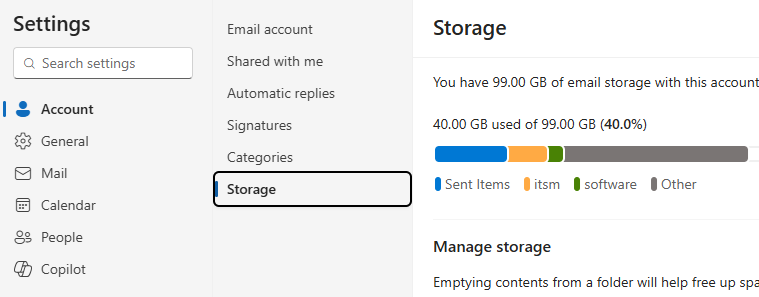
After logging in WebMail,
- Click the settings
icon. - Click Account > Storage.
- Your total and remaining email storage will be shown.