


Generative AI Service
Lingnan University fully embraces the use of AI tools in support of its teaching and learning. Starting from July 2023, the University has announced the policy of allowing the use of ChatGPT and other Generative AI tools in the 2023-24 academic year and onwards. The big plan to advance data literacy has also been developed to fully support the innovative adoption of generative AI tools in the teaching and learning environment of the University.
To support the above University’s policy, ITSC has developed and launched its ChatGPT service building on Microsoft’s Azure Open AI services in July 2023. It is free to all current staff and students. The service was subsequently expanded to include other AI tools. A new Generative AI Portal is developed and available in March 2025 to provide one-stop access for all University-supported AI tools.
Available to:
What is Generative AI?
Generative AI is a type of artificial intelligence that creates new content—such as text, images, audio, video, or code—by learning patterns from large datasets. Using models like large language models (LLMs) and diffusion models, they predict what to generate next to produce essays, summaries, translations, designs, melodies, and more based on prompts inputted by users. Many generative AI tools such as ChatGPT, DeepSeek, Gemini, etc. are available on the market. All the University-supported AI tools free for use by Lingnan staff and students will be available on Generative AI Portal.
Since its debut to the market in November, 2022, generative AI tools have swept the world with its powerful potentials and seemingly limitless possibilities. It has created huge impact on higher education with its great ability to transform teaching pedagogy and enhance work efficiency. Yet, the tool also has its negative effects in higher education. The University requires all staff and students to use this tool ethically and responsibly, ensuring compliance with the University’s academic integrity and honesty policy, data privacy policy and security policy.
How to Access LU Generative AI Portal?
Login to the Generative AI Portal using your Lingnan username and password via the following URL:
- Generative AI Direct Login *
- Login via myLingnan Portal (Academic Matters Tab > Generative AI Tools)
* Please note that a VPN connection is required when accessing from outside the campus network.
Users are requested to take note and agree to the terms and conditions for the use of the service.
Available Models
- GPT-4.1 mini
- GPT-4.1
- GPT-5
- DeepSeek R1
- DeepSeek V3
- o3-mini
- Gemini 3.1 Pro
- Gemini 3.1 Flash Image
- Gemini 3 Flash
Use Tips of LU ChatGPT
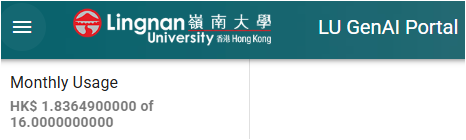
- Quota: To ensure fair use and control the cost within the University budget, each staff and student is limited to a fixed amount of expenditure in each calendar month. Thus, users should learn using prompts in an intelligent way to reduce the cost in terms of token use. The monthly usage of a user’s account is shown on the top right-hand corner of the portal.
- Use New Chat: Please start a new chat when the old chats are no longer needed. This will save the use of tokens dramatically.

- Delete Old Chats: Old chats are available on the right-hand side of the portal. Users can delete these old chats if they are no longer needed. Right-click to the chat and press “” to delete the chat. Users can also review and revise the old chats to start a new prompt by clicking the chat they would like to continue.

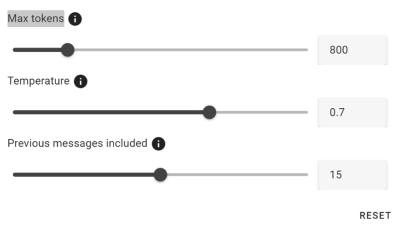
- Advanced Settings: The response is affected by its configurations in 3 components: Max tokens, Temperature and Previous messages included. A default value has been set in these three components. Adjusting their values will create a different response.
- Max tokens: Maximum tokens to be used for generating a response. A higher value means more tokens will be taken up in a response.
- Temperature: This parameter changes the output of the model. The value can be set between 0 to 1. A higher value such as 0.8 will make the output more random while a lower value will make the output more focused and concrete.
- Reasoning Effort (for reasoning models e.g. o3-mini only): Adjust the model’s cognitive load with low, medium, and high reasoning levels, providing greater control over the response and latency.
- Include previous files: Configure whether previously uploaded files are included ias conversation. Turning this on will increase the overall tokens used.
- Previous messages included: This is the number of previous messages to be included as conversation for generating a response. A higher value means that the response will be more accurate at the cost of tokens used.
- Contact us if you encounter any technical problems.