


HPC Getting Started
Getting Started
ITSC is excited to support your research and computational needs with our state-of-the-art High Performance Computing resources. Whether you are new to HPC or an experienced user, this page will guide you through the essential steps to get started, from setting up your login account to submitting your first job using SLURM.
Account Application
- The eligibility of the use of HPC platform is being reviewed and revised from time to time. Please refer to the HPC Resources Allocation Policy for details
- Eligible users, who may need adequate approval, can apply for a HPC account through the ITSC/Library Helpdesk system.
How to Access
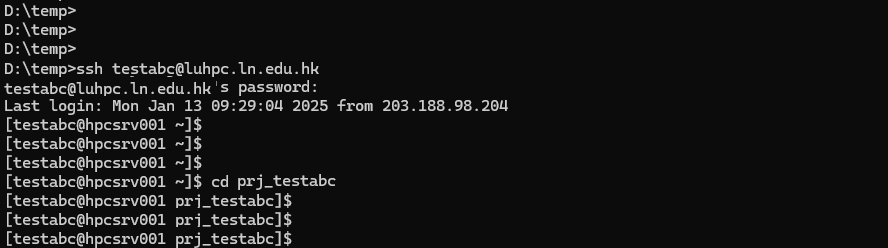
- Use an SSH terminal to access the HPC login node (e.g. the Windows CMD terminal) from a desktop PC in staff office or over the Lingnan VPN.
e.g. ssh <username>@luhpc.ln.edu.hk - Sign in using your campus-wide credential.
Change directory to pre-build working directory (prj_<username>).
cd prj_<username>Note: The soft limit of your home directory including this working directory is 500GB and the hard limit is 600GB for each user.
You can start develop or running program in the working directory prj_<username>.
Example for user: testabc
How to Submit Jobs Using SLURM
SLURM (Simple Linux Utility for Resource Management) is the core job scheduler powering our High-Performance Computing (HPC) environment, ensuring efficient and fair allocation of limited computational resources. Acting as a "traffic controller" for the cluster, it manages hundreds of interconnected compute nodes — individual servers with processors and memory—by intelligently assigning user-submitted jobs to available hardware.
When you submit a computational task, SLURM automatically queues it based on priority as set out in the endorsed resources allocation policy, checks resource requirements (like needed nodes or runtime), and schedules execution once matching resources free up.
This prevents system overload while maximizing utilization through parallel processing, where multi-part jobs run simultaneously across different nodes. By dynamically balancing demand, SLURM minimizes wait times, prevents resource monopolization, and lets researchers focus on science rather than logistics — turning scarce HPC assets into scalable productivity.
The following is the step-by-step guide that demonstrates how to submit a batch job to SLURM.
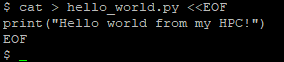
Step 1 Prepare the Python script
Sign in your HPC account and change to your project directory:

Create a “hello_world.py” file:
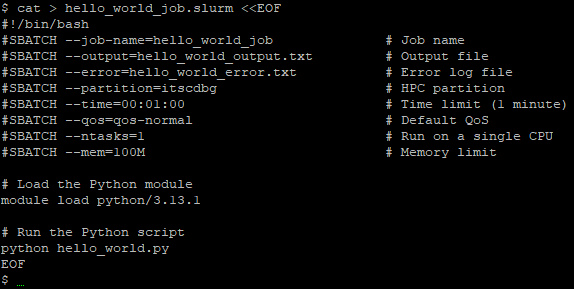
Step 2 Prepare the SLURM job script
Create a “hello_world_job.slurm” file:
Step 3 Submit your job and check the output
Submit your SLURM job on HPC using the SBATCH command:

Check the output of the job:
